
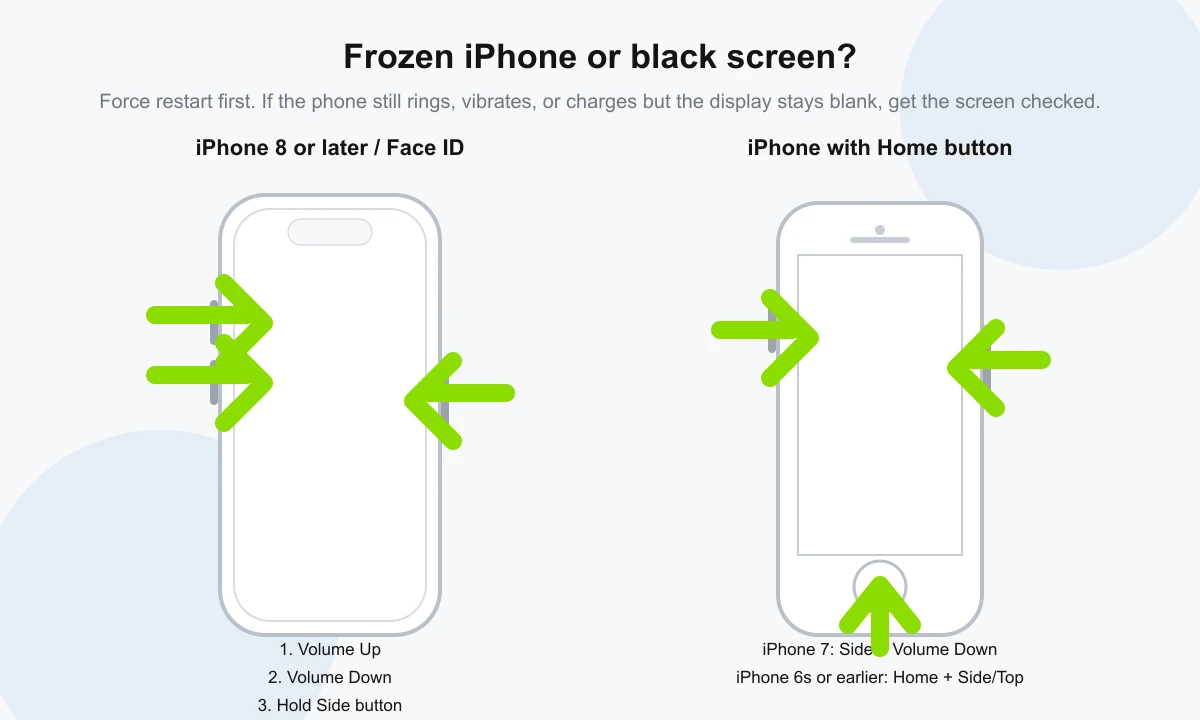
How to force restart an iPhone 8 or later
For iPhone models with Face ID, iPhone 8 and later, and newer iPhone SE models, use this sequence:
- Press and quickly release the Volume Up button.
- Press and quickly release the Volume Down button.
- Press and hold the Side button.
- Release the Side button when the Apple logo appears. This can take more than 10 seconds.
Apple lists this sequence in its official iPhone force-restart guide, and it is the best first step when the screen is frozen or touch is not responding.
What if your iPhone has a Home button?
The button combination depends on the model. On iPhone 7 and iPhone 7 Plus, hold the Side button and Volume Down button together until the Apple logo appears. On iPhone 6s, first-generation iPhone SE and earlier models, hold the Home button and the Side or Top button together until the Apple logo appears.
These older-model steps are also described in Apple's support article for an iPhone that will not turn on or has a black screen.
What if the screen is black but the iPhone is still on?
A black screen does not always mean the phone is dead. If the iPhone rings, vibrates, plays notification sounds, connects to a charger, appears in Finder or iTunes, or still triggers alarms, the logic board may be running while the display system is not showing an image.
Common causes include a damaged OLED or LCD panel, loose display connector after a drop, liquid damage, battery instability, failed backlight circuitry on older LCD models, or board-level damage. A force restart can clear a software freeze, but it will not repair a physically damaged screen.
Charge before deciding the iPhone needs repair
If the force restart does not work and the phone does not show any sign of power, connect it to a known-good charger and cable for about one hour. Check the charging port for lint or corrosion, but do not scrape it with metal tools.
If the phone shows a low-battery icon, let it charge longer before trying again. If it becomes hot, the battery is swollen, or it was exposed to water, stop charging and arrange inspection.
When should you bring it for diagnosis?
- The iPhone vibrates or rings, but the display stays black.
- The Apple logo appears, then disappears in a loop.
- The screen lights up faintly, shows lines, flashes green or remains blank after a drop.
- The phone was exposed to rain, pool water, seawater or moisture.
- The buttons needed for force restart are stuck, damaged or not clicking correctly.
- The iPhone gets unusually hot while charging or trying to start.
Smartfix Repair can test the display, battery, charging behaviour and visible liquid indicators at our Kuta workshop. If you are travelling and need fast iPhone screen repair in Bali, contact us before visiting so we can check part availability for your exact model.
Where to get iPhone repair help in Kuta
Smartfix Repair is located at Jl. Majapahit No.83 in Kuta and serves customers from Kuta, Legian, Tuban, Seminyak, Jimbaran and nearby areas. We can inspect frozen iPhones, black-screen faults, weak batteries, water damage and screen damage, then explain the repair options before work begins.
You can also browse our phone repair services in Kuta, read the seawater damage guide, or get directions to the shop.
Sources
Button sequences are based on Apple's official Force restart iPhone guide and Apple's support article for an iPhone that will not turn on or has a black screen.
